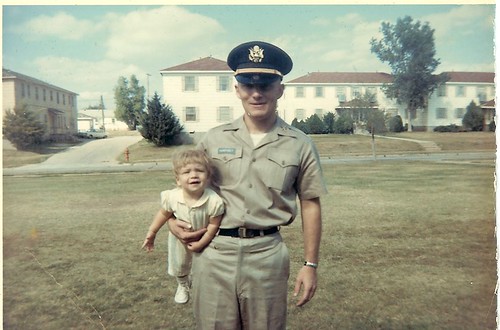
My father died of pancreatic cancer in May 2007 and today would have been his 66th birthday. He had had two previous battles with cancer and when he started feeling badly earlier that year, he thought he was just having some gastrointestinal problems. Because of his prior health history we assumed he would be diagnosed with Stage 4 melanoma and were dismayed to hear that it was indeed cancer of the pancreas - the grand daddy of cancers. He received his diagnosis on April 6 and passed away on the evening of May 24 – just a mere 7 weeks. I still miss him everyday!
Richard Stewart Humphrey was born in Utica, New York on March 10, 1944 to David and Katherine Humphrey. He was the third child of seven having an older brother, David, and older sister, Margaret and three younger brothers, Robert, Ronald and Donald and a younger sister, Katherine. He graduated from Whitesboro Central High School and attended Cornell University where he earned a Master’s in Metallurgical Engineering. He joined ROTC in college because he wanted to be an Army officer. He married my mother, Lucretia Verrilli, when he was a senior in college and served a tour in Vietnam before leaving the Army with rank of captain. He loved to snow ski and he stayed very active until he got too sick. His favorite color was green. He was known for telling jokes and throughout the years, my mother, sisters and I often became the “straight man” for the unsuspecting victim. He was able to find humor and weave a joke into so many situations. It was truly a gift! He was an avid fly fisherman and took all four of his grandchildren, Maria, Caper, Eva and Greta, trout fishing at one time or another. Since his death, another grandson, Augie, has been born. Unfortunately, little Augie will not know the joy of fishing with Grandpa. He was a wonderful father and grandfather and it is hard to summarize someone’s life in a few paragraphs. I set up a wiki right after he died as a place to collect some of our important stories and memories.
My husband, daughter and I were with my Dad the weekend of his diagnosis. I asked him to wear an mp3 recorder around his neck and had thought I would have more time than just that weekend to record his voice. But, he began chemotherapy the following week and faded so quickly. I have about 23 hours of audio files that are so precious because it is his stories and his voice that I often miss.
We planned a memorial celebration of my Dad’s life in October of 2007. I scanned photographs and using some of his favorite music, produced a digital movie using Photostory 3. Recently, I showed the video to a friend who encouraged me to share the video publicly. The process of gathering and organizing the pictures and music and creating the video took me well over 60 hours. I cried a lot, but feel it was an task worth doing. It was my tribute. My daughter wanted to talk about her grandfather at the memorial, but was afraid she would be too upset. So we wrote an introduction she recorded for the video. The entire video is 20 minutes long and also includes my daughter reading the following email my father sent shortly after he found out he was ill:
In 1981, when the doctor told us that he must discontinue my chemotherapy for Hodgkin’s Lymphoma because of complications, we were offered the risky option of radiation therapy, with a small chance of success, a certain chance of extreme suffering, and an 85 percent chance of developing leukemia. I wanted to see my daughters graduate from college and get stated in life, so we took the treatments and hoped for a few more years of acceptable health and were rewarded with twelve truly great years. I was starting to believe I was the luckiest man alive!
In 1993, when my second bout with melanoma started, the oncologists refused to take a chance with me, (because of my previous problems with chemo), so we were offered surgery, with the (almost) certainty that the melanoma would return somewhere, sometime. I wanted to see my daughters get settled and give us beautiful, talented grandchildren, so we traded my movie-star looks for fourteen more wonderful years and all of the great blessings, including Maria, Caper, Eva, Greta, and Kandace's expected. As bonuses, I've had the pleasure of knowing all of the other additions to the family, and the luxury of traveling to enjoy more great quality time with many of them and more often than I could have dreamed. I was convinced I was the luckiest man alive!
Friday last, we learned that I have been diagnosed with advanced cancer of the pancreas (aden carcinoma), and I will start chemotherapy on Tuesday. The symptoms came on fast and furious, normal for this cancer, with no real prior warning. This is the biggest gun of cancers, with the toughest odds yet, and not a battle I look forward to, but I've been so impossibly lucky so far that I have fewer fears and regrets than some might expect. You can find my prognosis on many websites, but I suggest not looking. We did find one website that states it is the #1 cause of Agent Orange deaths among Viet Nam vets, reinforcing my feeling about all of my maladies.
For those family members who were contemplating the June Reunion, we can only offer some premature thoughts. The chemo should last about seven weeks (May 22), and only God can tell you how a big party in June will sound by then. I suggest keeping the dates in mind, and if we have to cancel, using the time to celebrate something else worthwhile. We put the house on the market yesterday, and though the odds of closing, let alone selling it by then, are low, we'd hate to have to host you in a campground somewhere. Send me more ideas if you have them, please. Maybe a Farewell Tour if the health improves and holds out.
Of course, our longstanding invitation to visit any other time is still open, and amplified. Anyone we missed before has an invitation now. We can't guarantee a perfect time, but the beauty and solitude of our home can be attested to by those who have been here.
Please pass these thoughts along to anyone we missed, and pray or keep your fingers crossed or make any effort for us that you may feel could be helpful, including offering secret cures and remedies. I'm already consuming mass quantities of Tibetan Goji Berry juice, green tea, Indian dye, black walnuts, wild blueberries, and even some medicines from my doctors.
I have tried to make this truthful, hopeful but realistic, and not too morbid, and hope it comes across that way.
Love and Peace,
Dick and Lu
The Luckiest Man Alive from Karen Montgomery on Vimeo.
We were so lucky to have him in our lives, albeit for far too short a time. I will continue to love and miss him always. Happy Birthday, Dad!




 Posts
Posts


 Flickr/klmontgomery
 Facebook/Karen Montgomery
 Linkedin/Karen Montgomery
 Twitter/klmontgomery
 YouTube/klmontgomery
 Del.icio.us/klmontgomery
 GMail/Karen Montgomery
 pbwiki/klmontgomery